Technical Audits

Stop guessing which page is holding the site back

Find the exact page or repeated site pattern worth fixing first. Foglift checks one public URL for free with no signup, or up to 100 selected pages in a dated weekly full-site report from Launch.

Choose the scope

Choose the right scope before you lose a week

Get a direct answer for one page, or find a shared cause across the site. The single-page audit starts with a URL you already care about. The full-site audit discovers a wider set and connects every pattern to the selected URLs behind it.

Single page

Audit one public URL

$0

Free, unlimited, no signup

Use this for the page in front of you: a landing page, product page, article, documentation page, or a URL you just changed.

  • One public URL per audit
  • Run again whenever you need a fresh result
  • Prioritized findings attached to the audited page
  • Shareable result and PDF export

Full site

Find patterns across the site

$49/mo

Launch and above

Use this when the question spans templates, directories, content groups, or the whole domain and you need to decide where to work first.

  • Automatic weekly coverage
  • Manual availability once every seven days
  • Up to 100 selected pages per run
  • Dated whole-site report in Technical History

Outputs

Get the evidence each decision needs

Both formats preserve URL-level evidence. Full-site coverage adds the rollup needed to compare pages and identify a shared cause before the team works through isolated findings.

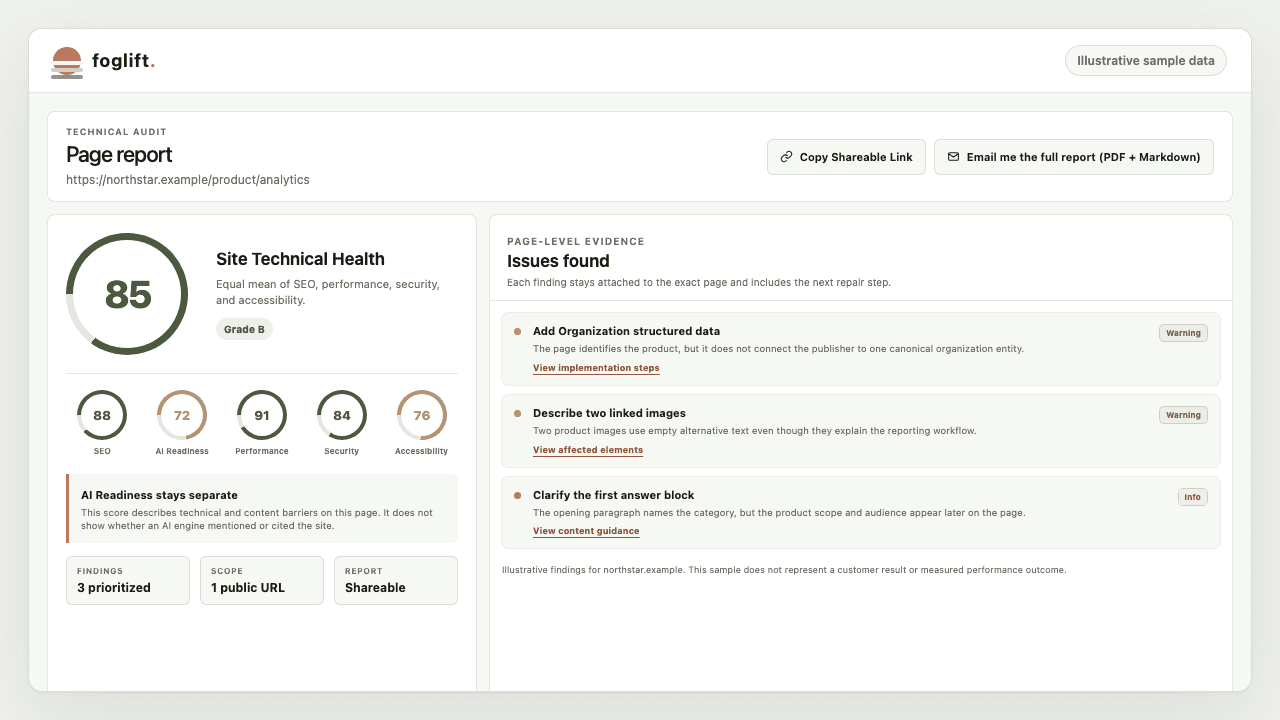
Illustrative single-page Technical Audit with an overall technical score, five category scores, and prioritized page findings
Illustrative URL and sample data. The shipped single-page report keeps the technical score, AI Readiness, category evidence, prioritized findings, and sharing actions together for the exact URL audited.
Your jobSingle pageFull site
Inspect one changed URLDirect page findings with a shareable result and PDFOpen its page row and supporting report from the site inventory
Find repeated defectsRepeat audits manually across the URLs you chooseGroup consistency, sitemap, crawler-policy, and architecture evidence across the selected set
Choose the next pageStart with the URL you already suspectCompare page findings and work down the weakest or widest-impact group
Keep dated evidenceSave or share each result and its PDFReturn to the completed run in Technical History and compare a later run

Full-site workflow

Turn a domain into a fix-first list

Move from a sprawling site to a focused repair plan. Whole-site coverage keeps the crawl boundary and the affected URLs visible at every step.

  1. Discover

    Read the domain's eligible URLs and site declarations.

  2. Select

    Choose up to 100 pages within the run budget.

  3. Analyze

    Attach technical observations to each selected URL and group repeated findings.

  4. Prioritize

    Use page findings and site-level patterns to decide which shared cause or page group comes first.

  5. Compare

    Return to Technical History after a later run and check whether the repaired group changed.

Plan boundary

Keep page checks free, then add site-wide coverage

Every plan includes unlimited single-page Technical Audits. Full-site coverage begins on Launch at $49 per month.

PlanMonthly priceSingle pageFull site
Free$0UnlimitedNot included
Launch$49/moUnlimitedWeekly, up to 100 selected pages
Growth$129/moUnlimitedWeekly, up to 100 selected pages
EnterpriseCustomUnlimitedWeekly, up to 100 selected pages

Detailed report

See exactly what the full-site report covers

The full-site product specification documents its report sections, bounded page selection, repeated-defect workflow, crawler-access boundary, and Technical History comparison loop.

Read the full-site Technical Audit specification

Questions

Technical Audit FAQ

What is the difference between a single-page and full-site Technical Audit?

A single-page Technical Audit evaluates one public URL and returns prioritized findings, a shareable result, and PDF export. A full-site audit selects up to 100 pages, adds whole-site sitemap, crawler-policy, internal-architecture, and consistency evidence, and saves the completed report in Technical History.

Is the single-page Technical Audit free?

Yes. The single-page Technical Audit is free, unlimited, and available without signup or a credit card. Enter one public URL to create a shareable result and PDF export.

Which plans include full-site audits?

Full-site audits begin on Launch at $49 per month. Launch, Growth, and Enterprise include automatic weekly coverage, plus manual availability when the workspace's seven-day window opens.

How many pages does a full-site audit cover?

Each full-site run discovers eligible URLs and selects up to 100 pages for analysis. The completed report states the discovered, selected, analyzed, and outside-budget counts so the scope stays explicit.

Which Technical Audit should I use first?

Use the single-page audit for a landing page, article, product page, or URL you just changed. Use the full-site audit when you need to find repeated defects, compare page groups, or decide which URLs deserve attention first.

Start with the scope you need today

Run the free single-page Technical Audit for one public URL, or review plans for weekly full-site coverage.