01
Catch template-wide failures
See when the same metadata, canonical, structured-data, status-code, redirect, crawler-access, or internal-link defect appears across multiple pages.
Full-site Technical Audits
Foglift checks up to 100 pages in one full-site Technical Audit, shows which defects repeat, and ranks the weakest URLs so your team can fix the shared cause first.
Fix the cause once
Turn a list of isolated page warnings into one repair plan. The site rollup exposes the pattern, and the page inventory shows every URL affected by it.
01
See when the same metadata, canonical, structured-data, status-code, redirect, crawler-access, or internal-link defect appears across multiple pages.
02
Sort the page inventory by AI Readiness and move directly from the site average to the URLs that need attention first.
03
Keep every completed report in Technical History, then compare the next run against the dated page evidence your team started with.
See the product at work
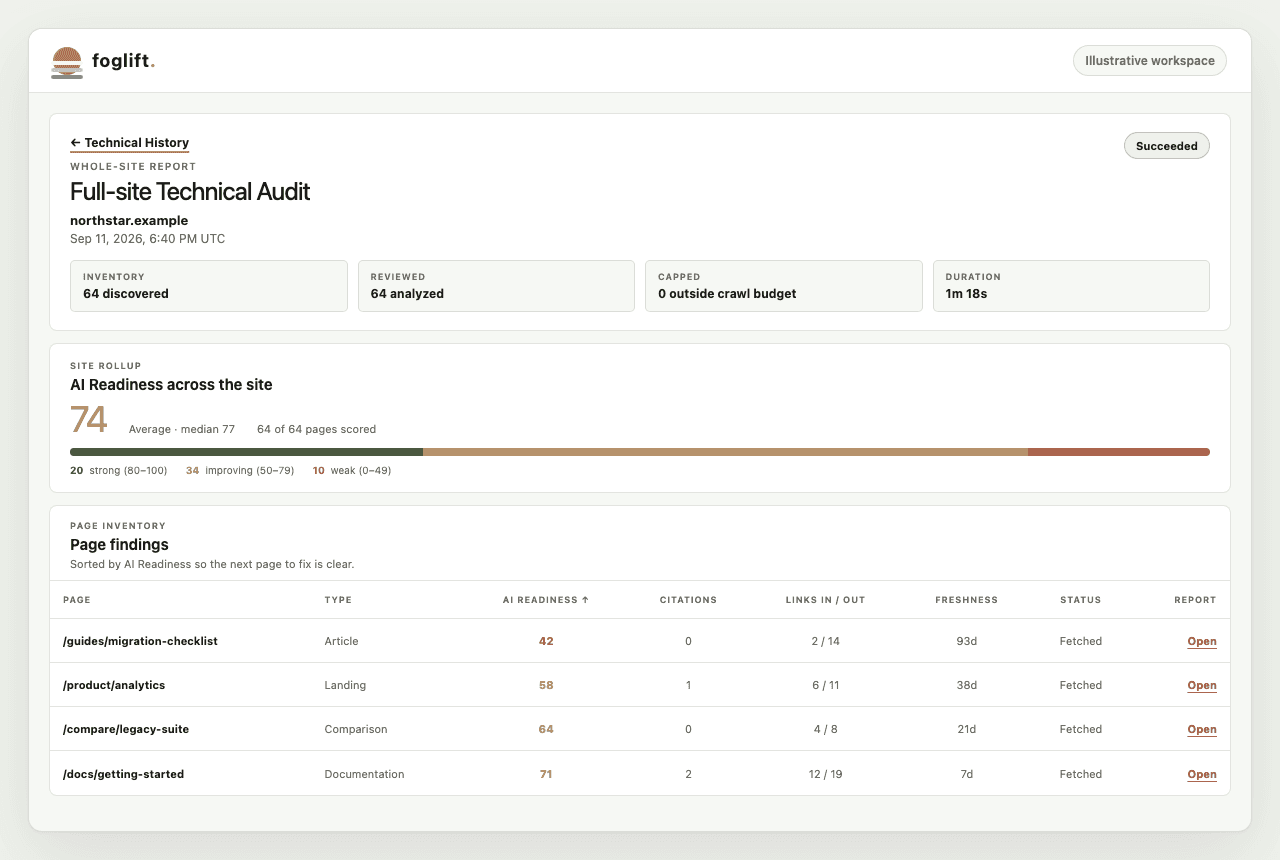
Start with the site-wide answer, then move into the exact pages and evidence behind it. Every report keeps the crawl scope, score distribution, repeated defects, and page inventory together.
Inside every report
See the evidence behind the ranking
| Report section | What it answers | Evidence shown |
|---|---|---|
| AI Readiness across the site | Which pages need attention first? | Average, median, scored-page denominator, score distribution, sortable page findings |
| Sitemap evaluation | Did the crawl cover the URLs the site declares? | Sitemap type, declared URLs, documents captured, protocol limits, robots.txt reference |
| AI crawler access policy | Can answer-search crawlers reach intended public pages? | Purpose-separated crawler rules and the number of URLs checked |
| Internal architecture | Can crawlers and people reach important pages? | Click depth, orphan pages, thinly linked pages, deep pages, strongest hubs |
| Consistency hygiene | Which technical defects repeat? | Origin status distribution, title and description defects, H1s, canonicals, redirects, JSON-LD, mixed content |
| Page inventory | Which URL should the team inspect next? | Page type, AI Readiness, citations, links in, freshness, fetch status, and saved single-page report links |
Crawler access is eligibility evidence. It does not prove that an engine indexed, cited, or recommended a page.Foglift keeps crawler policy, referral traffic, and answer-level AI Visibility as separate signals.
From crawl to confirmation
Move from the site-wide pattern to a focused repair, then use the next report to verify the result.
Start a full-site run when the seven-day availability opens. The audit discovers eligible URLs and selects up to 100 pages.
Read the score distribution and Site Technical Analysis to find defects shared by a template, directory, or page type.
Sort the inventory by AI Readiness and open the supporting single-page report when you need element-level evidence.
Group work such as schema, robots.txt, answer structure, canonical rules, and internal linking before isolated cleanup.
Use the next full-site report to confirm that the distribution changed and repaired pages moved out of the weak group.
A shared starting point
Replace scattered audit notes with one dated report that connects the site-wide problem to the pages your team owns.
Give every client the same technical review, a dated report, and the exact URLs behind each recommendation.
Find template-level defects and weak directories before another release repeats them across more content.
Capture canonicals, redirects, status codes, internal links, sitemap coverage, and crawler policy after launch, then confirm the next run.
Questions
A single-page Technical Audit measures one public URL across SEO, AI Readiness, performance, security, and accessibility. A full-site audit selects up to 100 pages, adds site-level sitemap, crawler-policy, internal-architecture, and consistency evidence, and preserves the completed whole-site report in Technical History.
Each full-site run selects up to 100 pages. The report shows the discovered, analyzed, and outside-budget counts so the evidence boundary is explicit.
Launch, Growth, and Enterprise include automatic weekly full-site coverage. An entitled workspace can also start a manual run when its seven-day availability opens.
No. The audit measures technical and structural readiness. Use AI Visibility monitoring to measure mentions, citations, sentiment, competitors, and share of voice across answer engines.
Unlimited single-page Technical Audits are available at $0. Full-site audits begin on Launch at $49 per month.
Start with a free single-page Technical Audit, then use Foglift full-site coverage to find every page carrying the same problem.