
AI search content briefs

Stop handing writers a pile of disconnected findings

Give the writer one brief with the question, the exact page anchor, the proposed edit, and the evidence behind it. Foglift turns a live page, recommendation, Query Fanout, or whole-site finding into a focused implementation handoff.

Public allowance
10 URL briefs per IP per hour
Workspace match
Up to five stored prompts per page
Generation
Template-based, no runtime model call

Three entry paths

Start with the work already in front of you

Bring a live URL, a planned topic, or a recommendation. The brief uses the evidence available for that starting point and carries the reason the work entered the queue.

Public URL brief

Inspect one live page without signing up

Enter a public HTTP or HTTPS URL. The generator fetches the page, calculates its current Page AI Readiness, and builds a brief from the page structure and deterministic findings.

The public route allows 10 requests per IP address in a rolling hour. An anonymous run does not use private workspace prompts or stored answer evidence.

Workspace page brief

Join the page to the prompts you already monitor

A signed-in brief selects up to five stored workspace prompts by language overlap with the page headings and description, then attaches the latest per-engine brand-mention status.

The status is a brand mention, not proof that the target page was cited. Provider-returned citation URLs remain a separate field.

Workspace topic brief

Plan a page from a diagnosed opportunity

A recommendation, Query Fanout, or whole-site audit can pass a topic and optional target path into the same workflow before a page exists. The exact source topic stays attached to the output.

A topic brief has no fetched-page score. Foglift removes the synthetic score projection instead of presenting planned work as a measured page result.

Brief anatomy

Give every editor a brief they can act on

Separate the question to answer, the edit to make, the diagnosed gap, and the context an editor can use. Six focused outputs keep research, structure, and implementation from collapsing into a vague writing prompt.

Target prompts
A topic brief starts with the exact requested question. A page brief uses workspace prompts when available, with high, medium, or low priority and the reason for each selection.
Anchored actions
Each action names an edit type, page anchor, current text, recommended text, rationale, target engine, and an estimated prioritization value.
Content gaps
Failed findings from Page AI Readiness dimensions below half of their available score become up to 10 high-, medium-, or low-impact gaps.
Structure recommendations
FAQ, entity, depth, citation-formatting, and heading findings can become section or schema tasks. A Key Takeaways block is included as a reusable summary pattern.
Repeated phrases
The keyword tab contains up to 15 repeated two-word phrases from the fetched page. These are page-language observations, not search-volume estimates.
Workspace context
Eligible Brand Kit guidance can be summarized into the brief. The output records whether knowledge context was applied and keeps it separate from observed answer evidence.
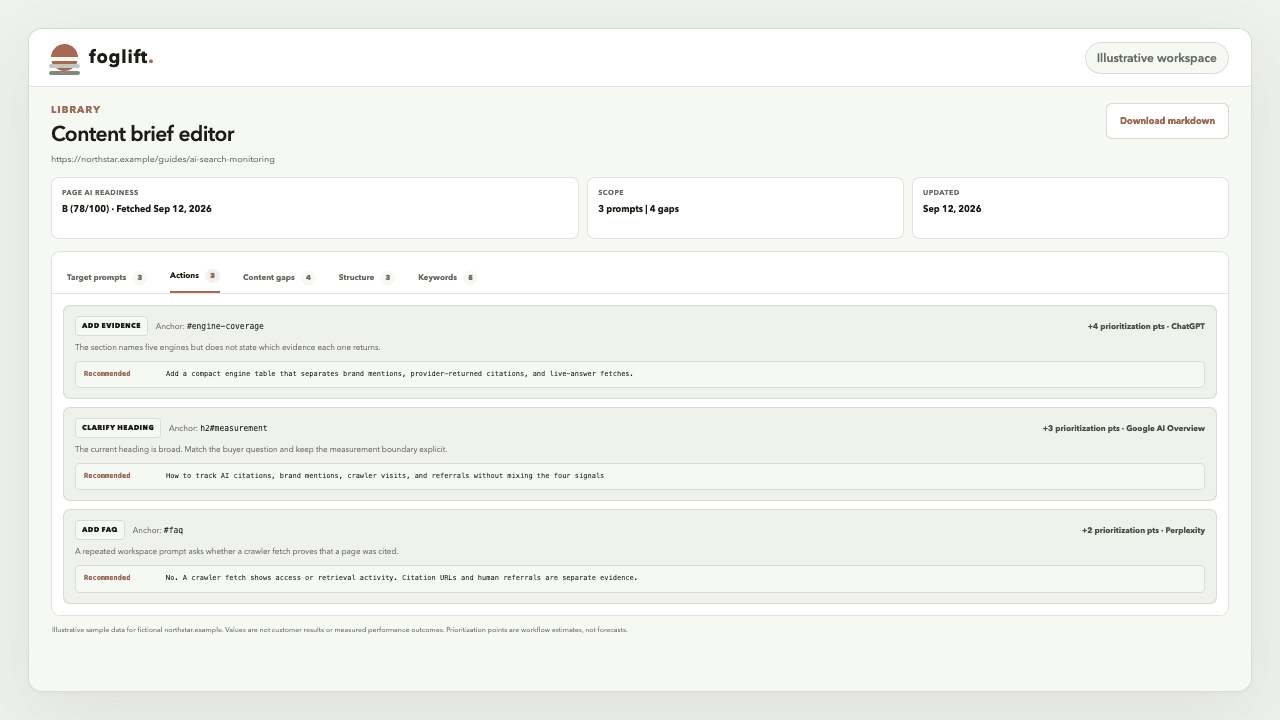
Illustrative Content Brief editor with five evidence tabs and three page-anchored actions for a fictional website
Illustrative fictional website and sample data. The shipped editor keeps the page anchor, rationale, recommended text, target engine, and prioritization value together, then carries the brief into a Markdown download. Values are neither customer results nor measured performance outcomes. Prioritization points are workflow estimates, not forecasts.

Recommendation handoff

Keep the reason attached to the work

Give the writer current instructions while preserving why the target matters. The brief evaluates the page or topic again, then turns the recommendation into an actionable handoff.

  1. 01

    The recommendation names the job

    Content-gap, citation-gap, visibility-boost, and competitor-counter actions can expose a Create brief handoff with a target page or topic.

  2. 02

    The target is fetched or planned

    Existing pages are fetched and measured. New topics use the workspace domain, a clean target path when supplied, and the recommendation source that produced the idea.

  3. 03

    Current evidence rebuilds the brief

    The generator applies current page findings, stored prompts, latest answer evidence, and eligible knowledge guidance. It does not copy the recommendation prose into the brief as fact.

  4. 04

    The handoff stays portable

    Review the prompts, actions, gaps, structure, and phrases in the workspace, then download the complete output as Markdown for an editor or development agent.

Evidence contract

Know what the brief knows

See which fields come from the live page, stored answers, language matching, or fixed prioritization rules. Clear labels help the editor use each signal for the decision it can support.

SignalSourceWhat it supportsBoundary
Page snapshotFetched HTML at generation timeCurrent structure and Page AI Readiness for that responseA later page edit requires a new brief
Prompt relevanceLanguage overlap with headings and descriptionUp to five stored prompts closest to the page wordingRelevance ranking is not search demand
Engine statusLatest stored answer per prompt and engineWhether the brand was mentioned, plus stored position when presentA mention is not a page citation
Competitor evidenceStored competitor mentions for the top promptThe highest-count competitor present in that answer evidenceMissing data stays empty; it is not inferred
Estimated lift pointsFixed values assigned to action typesA prioritization aid inside the briefNot a traffic, rank, score, or citation forecast

Plans and evidence

Start free, then add live workspace evidence

Generate a public brief from one URL with no signup. A signed-in workspace can add monitored prompts, answer evidence, recommendations, and saved knowledge as those signals become available.

PlanMonthlyBrief accessEvidence available
Free$0Public URL generator with no signup; signed-in page, topic, and recommendation handoffs where enabledWeekly Perplexity monitoring while active can supply workspace answer evidence
Launch$49/moThe same brief contract with Markdown export and broader workspace evidenceFive-engine monitoring up to daily, plus API, CLI, and MCP access
Growth$129/moThe same brief contract with larger workspace and knowledge allowancesFive-engine monitoring up to twice daily and Buyer-intent Win Rate
EnterpriseCustomThe same brief contract with custom workspace capacityFive-engine monitoring up to hourly and custom limits

Primary guidance

Make every edit clearer and easier to support

A brief can identify missing structure and evidence. The finished page still has to help the reader, match its visible markup, and meet the ordinary eligibility requirements of the search systems that may retrieve it.

Primary sources reviewed September 8, 2026.

Questions

AI search content brief FAQ

What does a Foglift content brief contain?

A Foglift content brief contains target prompts, page-specific actions, content gaps, structure recommendations, repeated two-word phrases, and evidence notes. A workspace brief can also show per-engine brand-mention status and the stored competitor evidence for the prompt most closely related to the page.

Does Foglift use an AI model to write content briefs?

No. Foglift content briefs are template-based and make no runtime language-model call. The generator applies deterministic rules to the fetched page, its Page AI Readiness findings, stored workspace prompts, current answer evidence, and any eligible Knowledge Base guidance.

How does a recommendation become a content brief?

Content-gap, citation-gap, visibility-boost, and competitor-counter recommendations can pass their target page or topic into the brief workflow. Foglift then rebuilds the brief from the target and current workspace evidence. The recommendation supplies the job to investigate; it does not become an unsupported instruction inside the brief.

Can I generate a content brief for a page that does not exist yet?

Yes, when the signed-in workflow receives a topic from Query Fanouts or a whole-site audit. Foglift creates a planned URL from the workspace domain and optional target path, keeps the source topic visible, and omits the synthetic page-score projection because no live page was fetched.

Is the public content brief generator free?

Yes. The public URL generator is free and requires no signup. It accepts one public HTTP or HTTPS page and allows up to 10 requests per IP address in a rolling hour. Workspace-aware briefs require a signed-in Foglift workspace.

Does an engine status in a brief mean the page was cited?

No. The per-engine status records whether the brand was mentioned in the latest stored answer for that prompt. A provider-returned citation URL is separate evidence. Foglift keeps brand mentions, citations, crawler requests, and referrals as different measurements.

Can I download a Foglift content brief?

Yes. Generated and saved workspace briefs can be downloaded as Markdown. The export preserves the summary, target prompts, actions, content gaps, structure recommendations, repeated phrases, and evidence notes that are present in the brief.

Start with one page

Give the next page a clear path from finding to fix

Paste a public URL for a free deterministic brief, or sign in to connect the target with your workspace prompts and answer evidence.

Content-focused recommendations use the deterministic recommendation workflow to decide which target enters the brief queue.