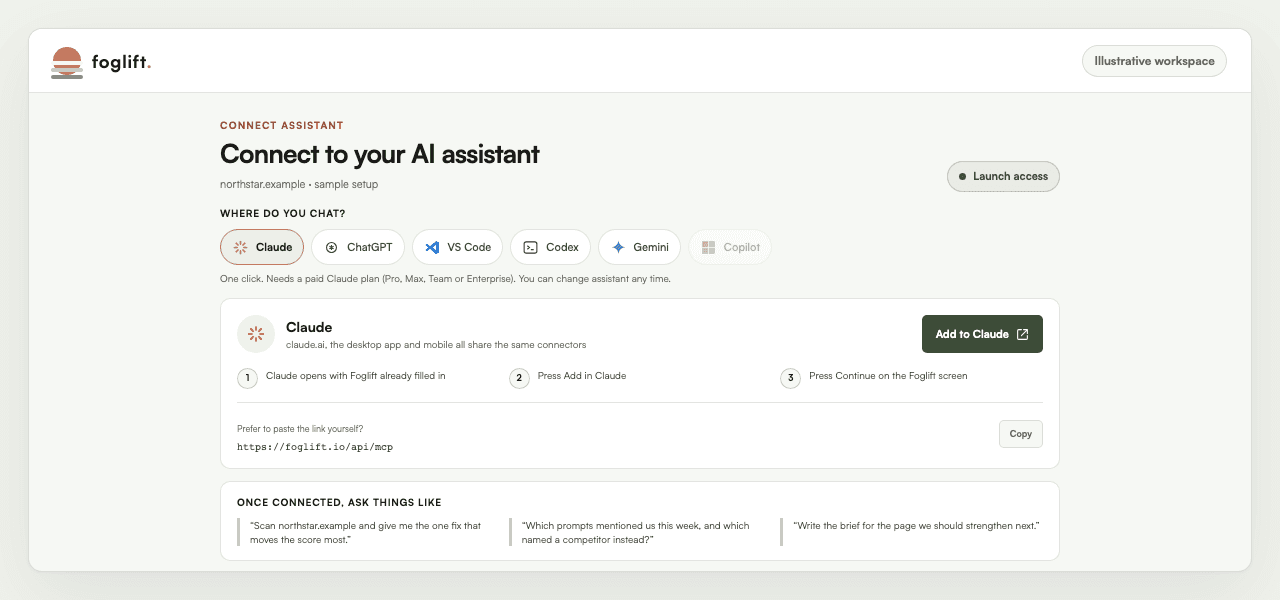
Connect Assistant

Ask your assistant what AI search says about your brand

Connect Foglift to Claude, ChatGPT, VS Code, Codex, or Gemini. Ask which pages get cited, what changed, and what to fix next. Your assistant answers from the visibility, audit, sentiment, and recommendation evidence in your account, then can draft the fix for your review.

Available on Launch and higher plans, starting at $49 per month.

What you can ask

Real questions, answered from the connected account

These six answers are a dated snapshot from the foglift.io workspace. Each answer carries its evidence source and date so a live metric never reads like an evergreen claim.

Ask

How are AI answers describing us?

Across 214 sentiment-enriched mentions, 143 were endorsements, 70 were neutral, one carried a caveat, and none were warnings. Overall sentiment was positive at 63 out of 100.

Source: Sentiment, Aug 8 to Sep 7, 2026

Ask

Which engine is most positive about us?

Claude scored 80 out of 100 across 20 analyzed mentions. Google AI Overview followed at 73 across 54 mentions, then Gemini at 68 across 33.

Source: Sentiment by engine, Aug 8 to Sep 7, 2026

Ask

What product language keeps repeating?

Product capabilities appeared as a recurring theme in 21 mentions. Answers repeatedly associated the brand with monitoring plus technical optimization, five-engine coverage, and developer access.

Source: Sentiment themes, Aug 8 to Sep 7, 2026

Ask

Which of our pages does ChatGPT retrieve?

Over the last 60 days, /what-is-foglift led with 37 ChatGPT citations. /developers followed with 30 and /monitor with 26.

Source: Citation history, Jul 9 to Sep 7, 2026

Ask

What should we strengthen next?

The top-ranked action scores 130.1161 and selects /blog/best-ai-monitoring-tools-2026 for a medium-effort strengthen pass. It carries five related prompts into the review and identifies the existing page as the target.

Source: Recommendations, generated Sep 6, 2026

Ask

Did the full-site audit finish?

The August 31 run succeeded. It discovered 782 URLs, selected 100 for analysis, and saved the whole-site report with the remaining 682 outside the run cap.

Source: Technical History, Aug 31, 2026

Works with

Use the assistant already in your workflow

Availability and setup paths below come from the same client registry as the in-app connection screen. ChatGPT and Gemini work today through the copy-and-paste path. Copilot alone is unavailable.

Claude

One click

One click. Needs a paid Claude plan (Pro, Max, Team or Enterprise). You can change assistant any time.

Available now

ChatGPT

Copy and paste

Paste route. Plus, Pro, Business or Enterprise; free accounts cannot add custom servers yet.

Available now

VS Code

One click

One click. Free, and it works in every VS Code workspace you open.

Available now

Codex

2 commands

Run both commands in the terminal where you use Codex. The second command signs in through your browser.

Available now

Gemini

Copy and paste

Personal Google account with AI Pro or Ultra, US only. Not Google Workspace or Business edition.

Available now

Copilot

Unavailable

Copilot cannot add custom tools yet. We will turn this on the day it can.

No connection path yet

Three steps

Connect once, then ask in plain language

Setup begins inside Foglift, where the account and brand scope stay visible. The connected assistant keeps its own permission and review model.

  1. Choose your assistant

    Open Connect Assistant and select Claude, ChatGPT, VS Code, Codex, or Gemini.

  2. Authorize the account

    Follow the client-specific setup, sign in, and approve the account-scoped connection.

  3. Ask, inspect, and draft

    Ask a visibility question, inspect the dated evidence, then have your assistant prepare the recommended change for review.

Plan boundary

Assistant access starts on Launch

Launch includes new assistant connections and developer access. Higher plans add monitoring cadence, brand capacity, full-site auditing, and agency delivery without changing the connection workflow.

PlanMonthly priceConnection and evidence boundary
Free$0No new assistant connections
Launch$49/moConnect Assistant, five-engine monitoring, REST API, CLI, and daily cadence
Growth$129/moEverything in Launch, twice-daily monitoring, ten brands, and full-site audits
EnterpriseCustomEverything in Growth, hourly monitoring, custom allowances, and full white-label delivery

For engineers

Need the protocol and API details?

The connection uses MCP (Model Context Protocol), an open standard for giving assistants permissioned tools. The technical references document endpoints, authentication, commands, and response contracts.

Questions

Connect Assistant FAQ

What can I ask a connected assistant?

Ask about brand mentions, cited pages, sentiment, competitors, monitoring prompts, Technical Audit history, account usage, and ranked recommendations. The response is scoped to the account and brand you authorize.

Which assistants can I connect today?

Claude and VS Code use a one-click path. ChatGPT and Gemini use a copy-and-paste server path. Codex uses two terminal commands. Copilot does not currently accept the required custom-tool connection.

Which plan includes Connect Assistant?

Connect Assistant starts on Launch at $49 per month. Growth is $129 per month, and Enterprise uses custom pricing. Existing connections remain readable and revocable after a downgrade, while new connections require Launch or higher.

Can the assistant change my site?

The connection supplies account evidence and supported actions. Any file edit or external action still follows the permissions and review model of the assistant or coding environment you connected.

Bring your AI search evidence into the conversation

Open Connect Assistant in Foglift, choose your client, and authorize the account you want it to read.